


Modivcare
4.610.76K Reviews
App Specs
- Version
- 1.5.16
- Updated On
- License
- Free
- Downloads
- 500,000+
- Developer
- Modivcare
- Categories
- Medical
- Platform
- Android, iOS
Screenshots

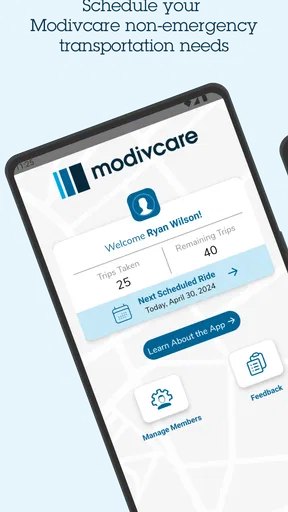
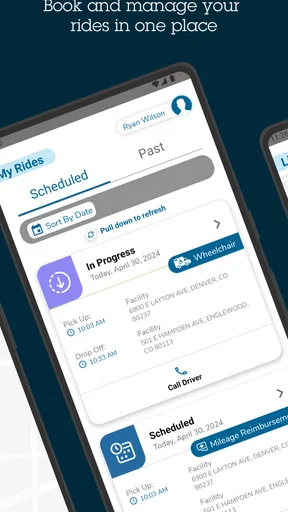
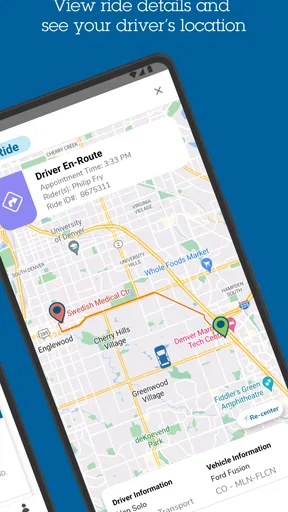
 Analysis by AppCompare
When a ride to a medical appointment depends on a booking going through, small setup snags can feel bigger than they are. I’d treat Modivcare as a practical tool for eligible members to arrange and manage trips, rather than as a general-purpose medical or navigation app. That distinction matters: its usefulness depends on whether you can access the member service and whether the trip you need fits the arrangements available to you.
Where users can get stuck
The first question is not how many buttons the app has; it is whether you can sign in and reach the trip-booking workflow. If registration or access does not go smoothly, check that you are using the details associated with your Modivcare membership and that the information is entered consistently. A mismatch in basic account details can stop progress before you ever get to planning a ride.
It also helps to separate a login problem from a trip problem. Being able to open the app does not necessarily mean a particular journey can be booked immediately. Before relying on it for an appointment, give yourself time to work through the request and confirm that the trip appears as expected. For an important visit, I would not wait until the last minute to discover that I need help with an account or booking.
The app is aimed at Modivcare members, so it is not a replacement for ordinary ride-hailing or a general way to find transportation. If you are not a member, or you need a ride that is unrelated to an eligible medical trip, a regular transport option is more suitable. That boundary is easy to overlook when an app’s purpose is described simply as arranging rides.
Setup checks that save time
Before making a booking, I’d check the practical basics: use the account details tied to your membership, confirm that the trip information is accurate, and allow time to review the request before an appointment. A clear destination and appointment plan make it easier to catch an input mistake while there is still time to correct it.
If you are helping a family member, agree in advance who will handle the account and keep track of the trip. That avoids a common source of confusion: one person assuming the other has completed the booking. It is also sensible to keep appointment details available while using the app, rather than switching between memory and a rushed form.
For readers wondering whether this costs anything to download, the app is free. Modivcare is a medical-category app from Modivcare, with an Everyone age rating; its current version is 1.5.13 and it requires Android 7.0 or later. It has an average rating of 4.5 from around 27,000 ratings, with about 10,000 written reviews and over 500,000 installs. Those figures suggest that many people have tried it, but they cannot tell you whether your own membership and trip needs will be a good fit.
Worth Reading Before You Choose

EA SPORTS FC Mobile 26 Is a Bigger Football Game, but It Takes Time

Flipboard Shows What News Apps Must Do Beyond the Feed

Switching to Android Auto Means Rethinking Your Driving Routine

Google Calendar Makes a Crowded Week Easier to Manage

Ludo King Makes the Most of the Minutes Between Plans

Baby Panda World Brings Quick Play to Modern Phones, but Its Game Library Feels Busy
Recovering a trip workflow
If a booking seems incomplete, I would pause before submitting the same request several times. First check whether the trip is already visible in the app, then review the details you entered. Repeated attempts can make it harder to tell which request is current, especially when you are also trying to coordinate an appointment.
If the request is still unclear, use the support route available through the app or contact the appropriate Modivcare assistance channel. When asking for help, have the relevant account and appointment details ready, but share personal information only through the proper support process. A concise explanation of what you tried and where the process stopped is more useful than starting over without knowing what went wrong.
A realistic use case is a member arranging transportation for a recurring medical visit. I would enter the trip well ahead of the appointment, verify the destination and date, and then check the booking again as the visit approaches. If a family member is assisting, I’d make sure both people know who will confirm any changes. This simple handoff can prevent missed messages and duplicate requests without assuming the app can resolve every scheduling issue itself.
When the app may not be the cause
A trip can be disrupted for reasons that have little to do with the phone: an appointment may move, the destination may change, or the transport arrangement may need attention from the service team. In those cases, repeatedly reinstalling the app is unlikely to solve the underlying issue. I’d first confirm the appointment details with the clinic, then check the trip information and ask Modivcare for help if the two no longer match.
Likewise, a slow or unreliable connection can interrupt any app-based task. If a screen does not update, wait briefly and check the booking status before trying again. For a time-sensitive appointment, keep a note of the relevant details and use the appropriate support channel rather than treating the app as the only way to communicate or make a plan.
Compared with calling to arrange a trip, an app can make it easier to handle the request from a phone and revisit the information later. A phone call, however, may be the better route when the situation is unusual, the booking is urgent, or you need a person to clarify what to do. Compared with ordinary ride-hailing, Modivcare serves a narrower purpose: it is for members managing medical transportation, not for choosing any ride on demand. That specialization is its main value, but it also defines who should skip it.
Getting Started with Modivcare
First things first, let’s talk about the initial setup. Downloading Modivcare is a breeze, whether you're team Android or iOS. Once you have it on your phone, the registration process is pretty straightforward. You’ll need to input some personal details, but hey, that’s standard procedure these days, right?
After you’re all signed up, the app takes you through a quick tutorial. This part is really helpful if you’re not too tech-savvy. The interface is clean and intuitive, so you won’t feel like you’re lost in a maze of features you don’t need. Trust me, I’ve been there.
Features That Stand Out
Now, onto the good stuff. What exactly does Modivcare offer? At its core, this app is designed to help you manage your healthcare appointments and transportation. But it’s got a few tricks up its sleeve that make it stand out.
- Appointment Scheduling: You can schedule, reschedule, or cancel appointments right from the app. It’s like having a personal assistant in your pocket. No more back-and-forth phone calls.
- Transportation Services: This is a biggie. Modivcare partners with various transportation providers to offer rides to and from your appointments. It's a lifesaver if you rely on public transport or don’t have a car.
- Notifications and Reminders: We all need a nudge sometimes, and Modivcare does just that with its timely notifications. You can customize these alerts to suit your schedule.
- User-Friendly Interface: The design is simple yet effective. You won’t be bombarded with too much information at once, which I personally appreciate.
User Experience
Okay, so how does it feel using Modivcare on the daily? Honestly, it’s a pretty seamless experience. The app is responsive, and I didn’t encounter any annoying lags or crashes. That’s a win in my book. Navigating through different sections is a breeze, and the icons are clear and self-explanatory.
One thing I noticed is how well it integrates with other calendar apps. If you’re someone who likes everything in one place, this is a feature you’ll love. All your appointments can sync up, keeping you organized without any extra effort.
Customer Support
Now, let’s talk about support. If you ever find yourself in a bind or have questions, Modivcare has got your back. There’s a help section within the app, and if you need further assistance, reaching out to customer support is easy. I had a minor issue and decided to test this out for myself. The response was quick and helpful, which is always reassuring.
Final Thoughts
All in all, Modivcare offers a solid solution for anyone looking to streamline their healthcare appointments and transportation needs. It’s user-friendly, efficient, and comes with features that genuinely enhance the user experience. Whether you’re tech-savvy or just getting started with apps, you’ll find it easy to navigate.
Would I recommend it? Absolutely. Especially if you’re someone who juggles multiple appointments or relies on external transportation. Give it a shot and see how it fits into your routine. Who knows, it might just become your new favorite app!
Who is most likely to benefit
I’d recommend considering the app if you are already a Modivcare member and routinely need help arranging transportation to medical appointments. Its value is less about replacing every part of trip planning and more about keeping the request connected to the service intended for those members. Someone who has several visits to coordinate may appreciate having a phone-based place to manage the process, rather than relying entirely on memory or separate notes.
It is a weaker fit for someone who only needs an occasional ride and already has a dependable way to get there, or for a person looking for a broad transport marketplace. It is also not the right tool for medical advice, appointment diagnosis, or emergency transport. I would use the appropriate emergency service for an emergency, and contact the clinic directly about clinical questions or changes to care.
A calmer way to plan appointment day
For an early appointment, I’d avoid treating a successful booking as the end of the task. I would check the visit time and destination against the trip details, make sure the person attending knows the plan, and leave a little room to respond if something changes. If another person is coordinating the ride, a brief confirmation between you can prevent two people from assuming the other has checked it.
That routine is especially useful when the appointment is one of several responsibilities in a busy week. A calendar can hold the medical visit, while the trip details remain something to verify in the transportation app. Keeping those roles distinct is a practical safeguard: a calendar reminder says when the appointment is, while the booking needs to be checked as its own arrangement.
What to expect from the experience
The strongest reason to use this app is its focused purpose. A general calendar can remind you about an appointment, and a standard ride service can offer transportation, but neither is necessarily a substitute for a member service designed around medical trips. On the other hand, a phone call can be more reassuring when a request is complicated or you are uncertain how to handle a change. I see the app and human support as complementary options, not competitors where one must always replace the other.
There is also a trade-off in using any account-based service: you need to keep the account details usable and make sure the information you enter matches the trip you need. That is ordinary friction, but it matters more when transportation is part of getting to care. A few minutes spent checking the request can be worthwhile; assuming that an unfinished or unclear screen means everything is settled is not.
In short, I’d choose Modivcare when I’m a member managing medical transportation and want a mobile route for handling trip arrangements. I’d use direct support when the booking is confusing or time-sensitive, and a different transport option for travel outside the service’s purpose. Its appeal is practical rather than flashy: it can make a specific part of appointment planning easier, provided you check the details and do not mistake the app for a guarantee that every real-world change will resolve itself.
Pros
- User-friendly interface for easy navigation.
- Real-time tracking of service appointments.
- Multiple language support for accessibility.
- Easy access to customer support via app.
- Integration with calendar for reminders.
Cons
- Limited offline functionality.
- Occasional delays in appointment updates.
- Requires strong internet connection.
- No dark mode option available.
- Limited customization of notifications.
FAQs for Modivcare
What is Modivcare and what does it do?
Modivcare is a mobile application designed to streamline and manage non-emergency medical transportation services. It allows users to schedule rides to healthcare appointments easily, track their ride status in real time, and receive notifications about their upcoming trips. The app aims to enhance accessibility and convenience for patients who require transportation assistance.
How do I schedule a ride using the Modivcare app?
To schedule a ride, download and open the Modivcare app, then sign in or create an account. Enter your pickup location, destination, and preferred time. The app will display available ride options based on your preferences. Confirm your selection, and you'll receive a confirmation notification along with the details of your scheduled ride.
Is the Modivcare app available for both Android and iOS?
Yes, the Modivcare app is available for download on both Android and iOS platforms. You can find it on the Google Play Store for Android devices and the Apple App Store for iOS devices. Ensure your device meets the app’s compatibility requirements for optimal performance.
Are there any costs associated with using the Modivcare app?
The Modivcare app itself is free to download and use. However, costs may vary depending on your healthcare plan or insurance coverage for non-emergency medical transportation services. It's advisable to consult your healthcare provider or insurance company to understand any potential charges you might incur.
What security measures does Modivcare implement to protect user information?
Modivcare prioritizes user privacy and data security. The app uses encryption protocols to protect personal and ride information. Additionally, it complies with HIPAA regulations to ensure that all health-related data is handled securely. Users are encouraged to review the app's privacy policy for detailed information on data protection measures.


